Posts

Showing posts with the label Indic transliteration

Quillpad: Phonetic Indic Transliteration typing tool

Image
Quillpad is a free online Hindi typing tool. One has to just type in English roman characters and it is converted in Hindi. It is considered to be the best online Hindi typing tool. You can also write English words in between. This online typing tool has been developed by Tachyon Technologies, India. Quillpad can not only be used for online Hindi typing but can also be used for other Indian Languages like Bangla, Gujarati, Tamil, Nepali, Marathi, Punjabi and several other languages. This is very useful for those who don't have Hindi keyboard, fonts or who are not comfortable in Hindi typing. Write in your favourite language, copy and paste where ever you like on the web, to post comments or to write post in your blog. It's really very easy, free and simple to use.
Internet Tools: Hindi Transliteration service in Google Talk

Google talk can be easily used to transliterate in Hindi. This is done by adding Google transliteration bot. You just have to type phonetic Hindi by typing English characters and press enter. It will be transliterate in Hindi. This service can be best utilised to post comments in Hindi. For enjoying transliteration through Google first you have to add transliteration bot in your contact/buddy list. Just add en2hi.translit@bot.talk.google.com and now you just type whatever you want to transliterate and it will be converted in Hindi. Copy and paste this Hindi text anywhere on the web, to post comments, or to write article on the blog. That's very simple. Isn't it?

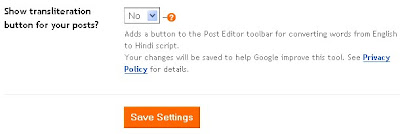
How to enable indic transliteration in blogger

Image
Now most of Indian bloggers who are blogging in Hindi must be knowing how to enable Indictransliteration in blogger, but there are many new bloggers who frequently ask questions in forums about its setting. In blogger one can easily create a blog and write in Hindi and other Indian languages just by enabling it from settings menu. Just from dashboard go to settings menu, scroll down to Global settings, there you will find option to enable or disable Indic transliteration. Just select "Yes" where you are asked to Show transliteration button for your posts? After enabling it you will find button added in your compose post page. Now you can blog in Hindi, Kannada, Malayalam, Tamil and Telugu. So go ahead, enable Indic transliteration and enjoy blogging in your native language.