Posts

Showing posts with the label Blogger tips

Recovering deleted blogger posts

Image
Recently while deleting unnecessary posts from one of my blog i accidentally deleted all my posts. There was no undo button to restore deleted posts which were deleted permanently. I was feeling very much sorry about it and started to think how to recover my blog posts and comments back. I visited google help forums and googled about it but got nothing useful. Forums suggested to recover older posts from googles cache but could recover only one or two posts. Then suddenly i got reminded that i have saved backup of my complete blog couple of days back in xml format through the feature of  blogger export import blog option. I imported the same xml file and my full blog was restored in seconds. I felt relaxed and patted myself for keeping blog backup through the export import feature of blogger to my computer hard drive. So i would suggest all blogger users to keep saving a backup of your blog so that if accidentally you delete your blog then recovering and restoring your blog will...

Republish your blog feed as html

Image
Do you have more than one blog and you want to republish and cross promote your content as an html then BuzzBoost feature of feedburner can be of your great use.   I will show you how to cross promote and republish your content via buzzboost feature in simple steps. If you already have a feedburner feed then the work is half done and if not then first create a feed in feedburner .  Log in to your Feedburner account> Click publicize button> You will find BuzzBoost option in left sidebar... click it.  Now here you will find a snippet of javascript.  Just copy and paste the code anywhere in our other blog or site. Your content is ready to travel. You can also use it as a widget in sidebar of your blog or site. You also get several options such as how many number of items to display, in what way you want to display your content etc. This is such a good feature that it can be republish your blog content anywhere in the blog or site in a very neat and cle...

Import Export Merge Backup blogger blog

Image
Blogger has added import, export, merge backup facility feature for blogger blog. Your blogger blog has now full portability feature. If you have several blogs and you want to integrate it in one blogger blog and start fresh, then now it has become possible. with latest Blogger import export feature you can merge scattered blog into one, not only that, now you can do more with your blog... Merge scattered blog into one blog and start fresh, means you can combine posts and comments from multiple blog and into a brand new blog. Move individual post from blog to blog that too with a single click. Cross publishing made easy. Backup your blog to your own storage. Lets you create backup copy of your blog posts and contents in your hard drive. Move your blog to somewhere else. You can move your blogger blog to somewhere else with export feature and later if you wish to come back to blogger then you can import your blog in seconds.

How to enable indic transliteration in blogger

Image
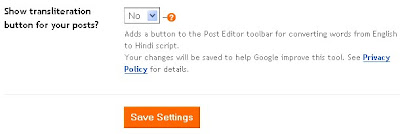
Now most of Indian bloggers who are blogging in Hindi must be knowing how to enable Indictransliteration in blogger, but there are many new bloggers who frequently ask questions in forums about its setting. In blogger one can easily create a blog and write in Hindi and other Indian languages just by enabling it from settings menu. Just from dashboard go to settings menu, scroll down to Global settings, there you will find option to enable or disable Indic transliteration. Just select "Yes" where you are asked to Show transliteration button for your posts? After enabling it you will find button added in your compose post page. Now you can blog in Hindi, Kannada, Malayalam, Tamil and Telugu. So go ahead, enable Indic transliteration and enjoy blogging in your native language.

Can't see small font? Try this to view large fonts

I have learnt a very new trick to view website or blogs having very small fonts. This is very helpful specially for Indic fonts ( Hindi, Malyalam, Telugu, Tamil,Kannad) . Most of the Hindi blogs and sites i have visited have so small fonts that it strain our eyes to read, and people with weak eyesight can hardly read it. To view the site or blog in bigger fonts size, just do the following...Just press and hold Control key (Ctrl) and move mouse wheel (Scroll wheel) to and fro to the monitor to increase or decrease the fonts size. It's really very simple. Try it now... and leave comments whether it's wonderful or not.

Google search box in blogger blog: searching made easy

Now you can add search box in your blogger blog. Adding search box in your blog helps readers to find out what they want. It is a feature to search over your blog, your blogroll, and everything you have linked to. This feature can be used while logging in blogger through http://draft.blogger.com and not you generally use as blogger dot com. Blogger in Draft: New feature: Search Box

Increase blog traffic by adding Subscription link widget

Now great news ! Want to improve your traffic. Subscribing your visitors is a great tool to increase your visitors and keep them updated. Now you can do this by adding a widget of "Subsription Links " to your blog. Its one click feature and six popular feed readers have been included. They are igoogle, google reader, blogliness, netwibes, newsgator and my yahoo. Blogger in Draft: New feature: Subscription Links

Cool and Interesting Gadgets for bloggers

Hi bloggers! great news is that now you can add one of several interesting gadgets to your blog. Adding gadgets in blogs helps in retaining and entertaining you blog visitors. So go ahead and add one to your blog. There are many gadgets to choose from but for that you have to log differently to blogger. instead of normal blogger you have to log via http://draft.blogger.com Blogger in Draft: New Feature: Gadgets for your Blog